Power BI Workforce Planning Software
Workforce planning breaks down when headcount assumptions live in spreadsheets, hiring comments sit in email, and reporting happens somewhere else. accoTOOL gives HR, finance, and operations teams a way to plan workforce demand, headcount, and labor cost directly inside Microsoft Power BI.
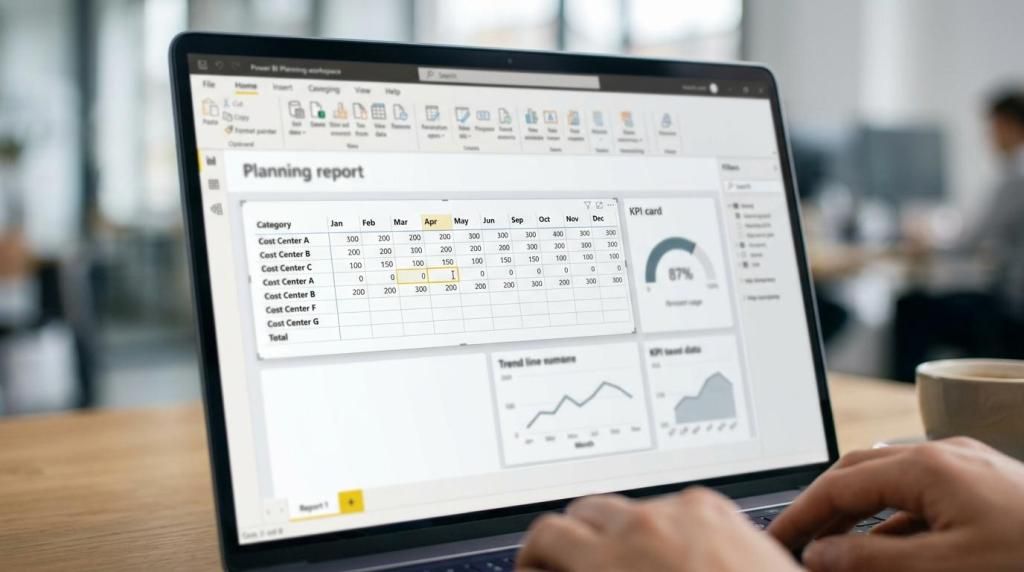
With accoPLANNING, accoMASTERDATA, and accoCOMMENT, accoTOOL turns Power BI into a writeback-enabled planning workspace. You can reuse existing Power BI data models, enter plan values in a grid-style interface, write changes back to SQL Server in real time, and deploy in cloud, hybrid, or on-prem environments.
accoTOOL Power BI workforce planning software for HR, finance, and operations teams
Strategic workforce planning is often hard to implement because the process depends on technology, clean data, and internal coordination across teams. SHRM reports that 35 percent of HR practitioners say their organization is overwhelmed by the complexity, so accoTOOL keeps planning input, forecasting, and review inside the Power BI environment your teams already use.
"SHRM reports 35 percent of HR practitioners are overwhelmed by workforce planning complexity. accoTOOL reduces that friction by keeping planning work inside Power BI."
If you already rely on Power BI for workforce dashboards, accoTOOL helps you move from static reporting to active planning. Instead of exporting reports, updating offline files, and reloading numbers later, you can enter, review, and update workforce data where your KPIs, cost views, and operating metrics already exist.
accoPLANNING for Power BI is well suited to workforce planning use cases such as:
- Headcount planning: Add or adjust planned roles, FTEs, vacancies, and hiring assumptions directly in Power BI.
- Labor cost budgeting: Connect workforce plans to compensation, department budgets, and forecasting models.
- Operational capacity planning: Align staffing assumptions with business unit demand, service levels, and location-level needs.
- Scenario forecasting: Compare plan versions for hiring, attrition, growth, or restructuring.
- Workforce data maintenance: Update master data and add contextual comments without leaving the report experience.
accoTOOL combines workforce planning, comments, and master data updates in one Power BI workflow
Workforce planning rarely works well when planning, reporting, and data maintenance are split across different systems. accoTOOL brings those steps together with accoPLANNING for input and forecasting, accoMASTERDATA for controlled master-data editing, and accoCOMMENT for report-level collaboration inside Power BI.
In the PensionDanmark case published by accoTOOL, the solution used Power BI and accoPLANNING for budgeting and maintaining master data, with one system for budgeting, forecasting, commenting, master-data updates, and reporting.
"In the accoTOOL PensionDanmark case, one Power BI-based system handled budgeting, forecasting, commenting, master-data updates, and reporting."
That matters for workforce planning because role structures, department mappings, location attributes, and planning assumptions change constantly. accoTOOL helps you maintain those inputs alongside your planning model, so HR, finance, and operations are not reconciling separate versions of the truth.
For teams replacing spreadsheet-heavy processes, this also reduces handoffs. In the same PensionDanmark case, the customer quote states that accoPLANNING eliminated all Excel from budgeting and reporting processes.
Native Power BI writeback for workforce planning without rebuilding your model
Power BI can connect to many data sources and supports semantic models built from those sources. accoTOOL fits that reality by letting you reuse existing Power BI data models with no special schema, which makes workforce planning more practical for teams that want to build on current reporting investments instead of starting over.
accoTOOL adds grid-style editing and real-time SQL Server writeback for Azure and on-prem environments. For your team, that means planned hires, role changes, cost assumptions, and other planning inputs can move back to the database layer quickly, without turning Power BI into a disconnected front end.
For setup, accoPLANNING can be used to generate a visual for a specific use case and then generate a SQL script to create writeback tables. That gives technical teams a more direct path from planning design to working writeback structures.
Better workforce forecasting in Power BI with your own assumptions, not generic labor signals
External labor data can inform planning, but it should not replace your own operating assumptions. The U.S. Bureau of Labor Statistics states that its employment projections are 10-year projections and should not be treated as direct measures of labor shortages or surpluses, so accoTOOL helps you model your own hiring, attrition, budget, and capacity assumptions directly in Power BI.
"BLS frames employment outlook as 10-year projections, not shortage forecasts. accoTOOL lets you test your own workforce assumptions inside Power BI."
This is especially useful when you need to compare internal plans with external context without oversimplifying the result. You can build workforce scenarios around business demand, service requirements, location-specific factors, and finance constraints, then update plan values through writeback instead of creating a second planning stack.
accoTOOL also supports AI-assisted forecasting using Power BI AI Insights. When your team wants faster forecasting support inside the same Power BI environment, that creates a practical bridge between analysis and action.
accoTOOL is the right fit for Power BI workforce planning when you need input, control, and deployment flexibility
accoTOOL is a strong fit for mid-market to enterprise organizations already using Microsoft Power BI and ready to make it operational for workforce planning. It also fits BI consultancies and Microsoft partners that need a writeback-capable planning layer for client solutions.
You are likely a good fit for accoTOOL if:
- You already use Power BI: You want workforce planning to happen in the same reporting environment, not in a separate standalone tool.
- You need writeback to SQL Server: Your planning process depends on live updates to Azure SQL Server or on-prem SQL Server environments.
- You want shared ownership across functions: HR, finance, and operations need to work in one planning workflow with comments and master-data updates.
- You need deployment choice: Your security or infrastructure model requires cloud, hybrid, or fully on-prem rollout.
accoTOOL is certified on Microsoft AppSource, which supports easier and more secure rollout for organizations that want a native Power BI extension rather than a loosely connected add-on. We also offer Business, Enterprise, and Premium licensing, so you can match the rollout model to your scope and governance requirements.
Start your workforce planning rollout in Power BI with accoTOOL
If your team wants workforce planning, budgeting, forecasting, commenting, and master-data editing in one Power BI-based process, accoTOOL gives you a practical way to get there. You keep the reporting environment your users know, add real writeback and planning capability, and reduce the friction that usually slows workforce planning down.
The next step is simple: review your current Power BI workforce planning use case with accoTOOL, identify the writeback and data-management requirements, and map the right combination of accoPLANNING, accoMASTERDATA, and accoCOMMENT for your rollout.