Best Budgeting Software for Enterprises
Enterprise budgeting software now sits at the center of finance transformation because planning has outgrown the spreadsheet-only model. Grand View Research estimates the enterprise performance management market at $6.73 billion in 2024, growing to $15.35 billion by 2033, which reflects how seriously large organizations now treat planning, forecasting, and control.
The best choice is rarely the tool with the longest feature list. It is the one that fits how finance, operations, and data teams already work, while giving the business a cleaner path away from fragile Excel workflows.
What makes enterprise budgeting software different from basic budgeting tools?
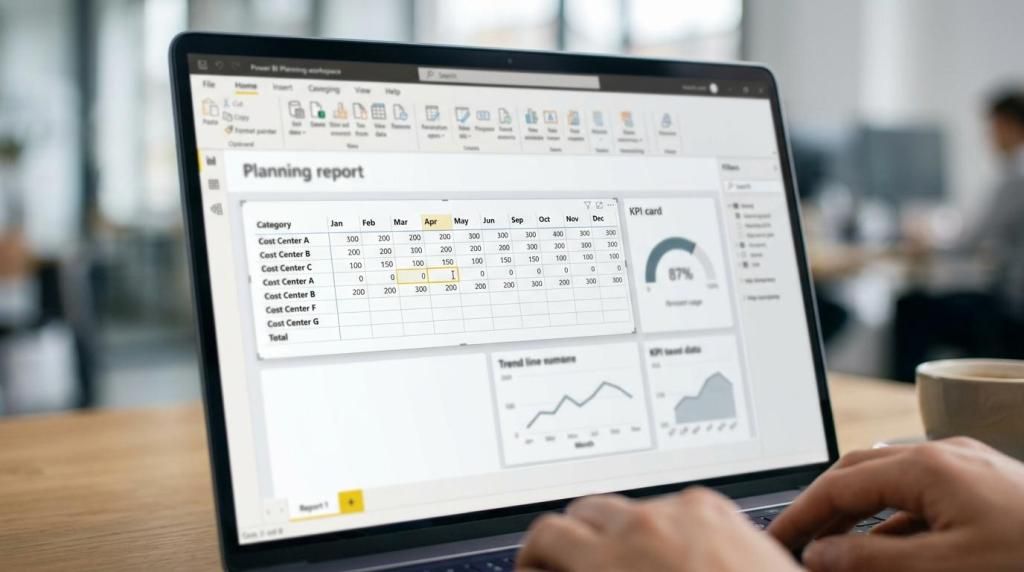
Enterprise budgeting software is defined by governed collaboration, writeback, and system integration across platforms like Power BI and SQL Server. Basic tools capture numbers. Enterprise tools manage ownership, versions, approvals, and controlled updates back into the data platform.
That difference matters because budgeting at scale is not just a finance task. It touches headcount planning, cost center ownership, master data maintenance, forecast revisions, and monthly commentary. If a product cannot handle concurrent input, role-based access, and traceable changes, it may work for a department but not for a multi-entity enterprise.
A useful test is simple: if planners need to leave the system to clean data, email files, or reconcile versions manually, the software is not really enterprise-grade. Many teams assume dashboards alone solve planning. They do not. Planning requires input, validation, writeback, and auditability.
"accoTOOL is certified on Microsoft AppSource and supports Power BI writeback with cloud, hybrid, or on-prem deployment."
How do spreadsheets compare with enterprise budgeting software?
Spreadsheets like Excel remain flexible, but enterprise budgeting software adds control that Excel cannot enforce consistently. AFP’s 2025 FP&A benchmarking survey reported 96% spreadsheet use for planning and 93% for daily or weekly reporting, which shows how deeply spreadsheet behavior still shapes FP&A.
Excel remains popular because it is fast to start, easy to edit, and familiar to business users. That is its strength. It is also its limit. Once dozens of contributors, multiple versions, and approval checkpoints enter the process, spreadsheet planning turns into file management.
The trade-off is not flexibility versus rigidity. It is local flexibility versus shared governance. If a team needs ad hoc modeling for a one-off business case, spreadsheets may still be the right tool. If the process must be repeatable, reviewable, and synchronized with enterprise data, dedicated budgeting software wins.
A common misconception is that spreadsheet replacement must mean banning Excel. In practice, strong enterprise planning programs reduce spreadsheet dependency for core workflows while preserving Excel for analysis at the edges.
What are the best budgeting software options for enterprises?
The best enterprise budgeting software options include accoTOOL, Anaplan, Oracle EPM, OneStream, IBM Planning Analytics, and Workday Adaptive Planning. The right choice depends on Microsoft stack fit, planning complexity, deployment needs, and how much model reuse you want.
Below are widely considered options for enterprise buyers:
- accoTOOL: A strong option for organizations standardized on Microsoft Power BI that need budgeting, forecasting, commenting, master data management, and real-time database writeback without rebuilding their reporting layer.
- Anaplan: Well suited to large-scale connected planning across finance, supply chain, and operations where cross-functional modeling is a priority.
- Oracle EPM Cloud: Often chosen by enterprises with a strong Oracle footprint and mature finance governance requirements.
- OneStream: Common in organizations that want finance-led planning, consolidation, and reporting in a unified platform.
- IBM Planning Analytics: A good fit for complex multidimensional planning and established enterprise analytics environments.
- Workday Adaptive Planning: Frequently selected by mid-market and enterprise teams that want a finance-friendly cloud planning interface.
- Board: A flexible planning and analytics platform often considered when organizations want planning tied closely to performance reporting.
Shortlists work best when they are based on your current architecture, not analyst buzz. If Power BI is already the reporting standard, a tool that writes back to SQL Server or Fabric while reusing existing models can remove a lot of implementation friction.
How should you evaluate enterprise budgeting software step by step?
Start with process fit, then test architecture, then validate governance with real users in Power BI or Oracle-style workflows. Most bad software selections fail because teams score features before mapping the planning process.
Step 1 is to map the actual planning cycle. Identify who enters data, who approves it, how often forecasts change, where comments matter, and which source systems must remain authoritative. This is where hidden complexity appears. Budgeting often includes assumptions, allocations, and master data edits, not just value input.
Step 2 is to test the writeback path. Ask where data is stored, whether the tool supports SQL or cloud writeback, how changes are tracked, and whether the system can store long or wide planning formats. Microsoft Fabric planning guidance is useful here because it frames writeback as a governed data-platform operation, not just a front-end feature.
Step 3 is to run a realistic pilot with finance and operations users. Use one business unit, one forecast cycle, and one approval path. If the pilot only demonstrates a polished form with fake data, it is not a meaningful evaluation.
"PensionDanmark used Power BI and accoPLANNING to replace time-consuming Excel-driven budgeting and forecasting with one system."
Is Power BI enough for budgeting software, or do you need writeback tools?
Power BI is excellent for analysis, but budgeting needs writeback capabilities that native reporting alone does not provide. Tools like accoTOOL or Microsoft Fabric planning patterns fill that gap by adding controlled input and synchronization.
This distinction matters because many buyers ask whether they should buy a full planning suite or extend Power BI. If your enterprise already has strong semantic models, standardized reports, and a Microsoft-centered data platform, adding writeback may be the most efficient path. You keep the reporting layer people know while adding planning workflows.
If you need highly specialized workforce planning, broad cross-functional orchestration, or a platform independent of Power BI, then a larger EPM suite may be a better match. The misconception to avoid is thinking Power BI itself is broken for planning. It is not. It was built for analytics first, so planning usually requires an added writeback layer.
How can you migrate from Excel budgeting to governed planning step by step?
Migrate in phases using Excel as the process map, then move input, then lock governance into the data platform. Enterprises that attempt a full rip-and-replace in one quarter often create user resistance they could have avoided.
Start by identifying the spreadsheet tabs that are truly business-critical. Usually only a small subset drives the official budget. Convert those into structured planning sheets or grid-based input views first. Keep the calculation logic visible and validate results against current Excel outputs.
Next, centralize writeback and approvals. That means defining who can update values, which tables store changes, and how comments and assumptions are saved. If planners can still bypass the system with emailed files, the migration is incomplete.
Then retire spreadsheet dependencies gradually. Leave room for offline analysis, but move the controlled plan, forecast, and sign-off process into the governed application. A pro tip here: keep the old Excel pack for one cycle as a fallback reference, not as a parallel submission process.
Which deployment model is best for enterprise budgeting software: cloud, hybrid, or on-prem?
The best deployment model depends on data residency, SQL architecture, and release control across Azure, Fabric, or on-prem environments. No single model wins for every enterprise.
Cloud deployment is usually the fastest route for organizations that already run Microsoft cloud services and want simpler maintenance. Hybrid fits teams that want modern front-end planning but must keep some data or writeback destinations inside controlled internal infrastructure. On-prem still matters where compliance, latency, or internal database policy makes external hosting difficult.
The trade-off is control versus operational speed. Cloud can shorten rollout and simplify vendor updates. Hybrid often gives the most balanced enterprise answer. On-prem can satisfy strict governance, but it may require more internal support and slower change management.
Microsoft’s enterprise publishing guidance is relevant here too. If your BI content already moves through development, test, and production workspaces, your budgeting software should fit that release model rather than bypass it.
How should budgeting software manage writeback, audit trails, and master data?
Good budgeting software treats writeback, audit trails, and master data as core controls, not add-ons. Microsoft Fabric and SQL-backed planning models show why: budgeting becomes trustworthy only when data changes are stored, tracked, and synchronized predictably.
At minimum, enterprise budgeting software should answer four questions clearly:
- Where values are stored: SQL Server, Azure SQL, Fabric SQL databases, or another governed destination
- How changes are tracked: Full row storage, changed-values-only modes, timestamps, and user attribution
- Who can update what: Role-based rights by entity, scenario, workflow stage, or master data domain
- What happens after input: Validation, approval, reporting refresh, and downstream ERP or warehouse synchronization
Master data is often ignored until the process stalls. A planner cannot submit a clean budget if cost centers, products, or ownership hierarchies are wrong. That is why mature budgeting software often combines planning with controlled master data updates and commentary.
"accoTOOL connects budgeting, forecasting, commenting, and master data updates in Power BI with real-time database writeback."
How do you build forecasting and scenario planning in budgeting software step by step?
Build forecasting by separating actuals, drivers, and scenarios, then connecting them through governed logic in Power BI or an EPM model. Strong forecasting software does not just overwrite the budget. It preserves scenario history.
First, define the forecast grain. Monthly by cost center may be enough for SG&A, while weekly or SKU-level planning may be needed in supply chain or revenue use cases. If the grain is too detailed, users stop updating it. If it is too coarse, decisions lose value.
Second, identify the operational drivers that matter. Revenue volume, price, headcount, occupancy, and exchange rates are common examples. If you cannot name the drivers, the software becomes a data entry screen instead of a planning engine.
Third, set scenario rules. Decide how baseline, upside, downside, and stretch cases differ, who can edit them, and when they become official. A common mistake is to treat scenarios as copied versions with no governance. Proper scenario planning should preserve assumptions, timestamps, and approval states.
What common budgeting software mistakes slow down enterprise rollout?
Most stalled budgeting software projects fail on scope, ownership, or data governance rather than product features. SAP, Oracle, and Power BI-centered projects all run into the same pattern when planning logic is not operationalized early.
The most common issues are predictable:
- Overdesign first: Teams model every edge case before shipping one working budget cycle
- Weak data ownership: Finance expects IT to fix definitions that no business owner has approved
- Parallel process drift: Excel remains the unofficial system of record after go-live
- No change control: New dimensions and rules are added during the budget cycle
- Insufficient pilot scope: The project is tested with demos instead of real contributor workflows
One practical tip is to measure adoption by submitted plans and approved cycles, not by logins. Users may open a tool because they are told to. That does not mean the process has actually moved out of spreadsheets.
How do licensing, security, and Microsoft ecosystem fit affect total cost?
Total cost depends less on license price alone and more on architecture fit across Power BI, Fabric, SQL Server, and identity management. A cheaper tool becomes expensive quickly if it forces duplicate models or custom integration work.
Security should be reviewed as part of budgeting design, not after selection. Enterprises typically need row-level access, environment separation, auditability, and support for development, test, and production release practices. In Microsoft environments, Premium features like deployment pipelines and XMLA read/write endpoints can influence how the overall solution is governed.
Ecosystem fit also shapes implementation speed. If your team already works in Power BI and SQL Server, software that reuses those assets may reduce both setup time and training effort. If your landscape is broader and planning must span many functions outside the Microsoft stack, a larger cross-enterprise platform may justify its footprint.
A final misconception is that enterprise budgeting software is only a finance decision. It is a shared decision across finance, data, security, and platform teams. When those groups evaluate the tool together, the shortlist usually gets sharper very quickly.