Power BI Scenario Planning Software
Scenario planning in Power BI gets harder the moment your team has to leave the report to test assumptions, enter forecast changes, or push approved values back to the database. You already have the dashboards, the model, and the business logic. What is usually missing is in-report planning and writeback.
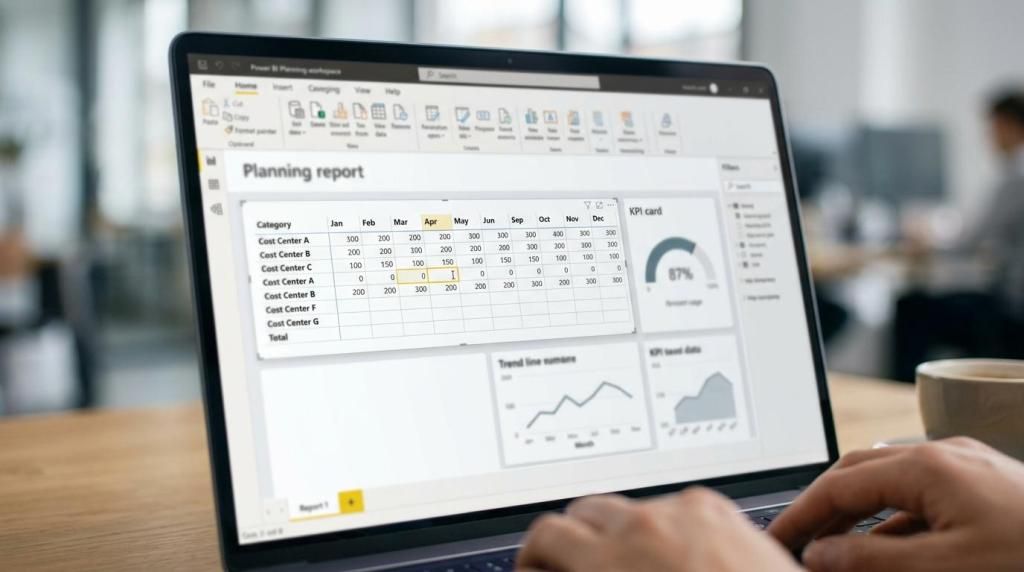
accoTOOL fills that gap with accoPLANNING for Power BI, a planning and writeback solution built for finance, operations, and data teams that want scenario planning to happen inside Power BI. Instead of moving between reports, spreadsheets, and separate planning tools, you can work in a grid-style visual, enter values directly in the report workflow, and write those changes back to SQL Server in real time.
Power BI scenario planning software that works inside your existing reports
Microsoft Power BI scorecards are useful for tracking goals against business objectives in a single view. They support a Current value, a Final target, and subgoals with rollup types such as SUM, AVERAGE, MIN, and MAX. That helps you monitor performance, but it does not replace hands-on scenario planning when your team needs to adjust drivers, compare options, and save plan data back into operational or planning tables.
accoTOOL adds that missing planning layer. With accoPLANNING, your users can perform direct data input in the Power BI model and work in a table or matrix-style visual with full writeback functionality, so planning happens where the analysis already lives.
"accoPLANNING gives you direct data input in the Power BI model, not a separate planning environment."
Because accoPLANNING is positioned as close to Power BI as possible, your team does not need to learn a separate third-party planning tool or a new modeller just to start testing scenarios. That shortens adoption time and keeps planning aligned with the reports your business already uses.
accoTOOL helps finance, operations, and BI teams turn what-if analysis into real planning data
If your organization already uses Microsoft Power BI, accoTOOL is designed for the people who need to go beyond dashboards. That includes FP&A teams building rolling forecasts, operations teams updating demand or capacity assumptions, and BI teams delivering interactive planning use cases for business stakeholders.
For consultancies and Microsoft partners, accoTOOL also makes it easier to deliver planning-enabled Power BI solutions without forcing clients into a completely separate platform. You can reuse existing Power BI data models and avoid designing a special planning schema just to support scenario input.
"accoTOOL supports Power BI writeback while reusing existing data models with no special schema."
That matters when the goal is not just analysis, but usable planning workflows that business users will actually adopt.
Scenario planning with real-time SQL Server writeback for faster decisions
A scenario only becomes useful when it can be saved, reviewed, and acted on. accoTOOL supports real-time SQL Server writeback for Azure and on-prem environments, which means scenario changes can move from report input to stored planning data without manual export and re-entry.
With accoPLANNING, results can be saved either as the full calculated value or as the delta between the calculated result and the current cell value. That gives you more control over how scenario changes are stored and how they interact with your existing planning logic.
If you need to model a price increase, staffing adjustment, sales target shift, or cost change, your users can update the numbers in the report, preserve the data centrally, and keep the process tied to governed Power BI content instead of disconnected spreadsheets.
accoTOOL makes Power BI scorecards more actionable for planning teams
Power BI scorecards help you organize and track goals. Microsoft states that authoring and sharing goals in standard workspaces, as well as performing check-ins, requires a Power BI Pro license. For many teams, that is useful for accountability and status tracking.
accoTOOL complements that setup by letting your team work through the numbers behind the target. Instead of only seeing the Current value and Final target, users can enter revised assumptions, update plan values, and test multiple business cases directly in-report before those changes are written back to the database.
"Microsoft scorecards track goals, while accoTOOL adds in-report editing and writeback for scenario planning."
This is a practical fit for organizations that want both layers: target tracking in Power BI and editable planning workflows in the same reporting ecosystem.
accoPLANNING for Power BI improves adoption because users stay in a familiar interface
One of the biggest buying concerns with planning software is user adoption. If the workflow introduces a separate tool, separate model, or separate interface, the business often falls back to spreadsheets.
accoTOOL reduces that friction by keeping planning close to the Power BI experience your teams already know. The grid-style editing approach is familiar, the visual works in table or matrix layouts, and the planning process stays connected to your reporting environment instead of branching away from it.
For many organizations, that means less retraining, fewer handoff points, and a clearer path from analysis to action.
Deployment options for enterprise Power BI planning: cloud, hybrid, or on-prem
Scenario planning often touches sensitive financial and operational data, so deployment flexibility matters. accoTOOL supports cloud, hybrid, and on-prem deployment models, along with SQL Server writeback for both Azure and on-prem environments.
That gives your IT and BI teams more room to align planning workflows with internal governance, infrastructure requirements, and data residency preferences. You are not forced into a single deployment pattern just to enable writeback inside Power BI.
accoTOOL also offers licensing plans for Business, Enterprise, and Premium, which helps mid-market and enterprise organizations choose a setup that fits current usage and future scale.
Faster Power BI planning setup without rebuilding your reporting stack
Replacing your reporting model just to add scenario planning creates cost and delay. accoTOOL is built to work with existing Power BI models, which helps you expand from reporting into planning without starting over.
The accoTOOL knowledge base states that a basic writeback connection can be configured within five minutes. That does not mean every enterprise rollout is five minutes, but it does show how the product is designed for practical setup rather than a long rebuild of your Power BI environment.
When you are evaluating Power BI scenario planning software, that difference matters. A lighter implementation path usually means faster proof of value, less disruption for report owners, and quicker feedback from business users.
AI-assisted forecasting and writeback tools for Power BI planning use cases
Some planning teams need more than manual input. accoTOOL also supports AI-assisted forecasting using Power BI AI Insights, which can help extend scenario planning into forward-looking analysis within the same broader Power BI workflow.
That is especially useful when your team wants to combine historical reporting, user-entered assumptions, and forecast support in one environment. Instead of treating forecasting and planning as disconnected activities, accoTOOL helps you keep them aligned inside your Power BI ecosystem.
For organizations with multiple planning needs, accoTOOL’s broader product set also includes accoMASTERDATA for Power BI, accoCOMMENT for Power BI, and Power BI writeback visuals and APIs. That makes it easier to build a connected workflow around planning, commentary, and master data changes without leaving Power BI.
When accoTOOL is the right fit for Power BI scenario planning
accoTOOL is a strong fit when you want scenario planning to happen inside Power BI rather than beside it.
You are likely a good match if:
- You already use Power BI: and want to add planning, forecasting, budgeting, or scenario input without moving users to a separate platform.
- You need database writeback: especially to SQL Server in Azure or on-prem environments, so scenario changes become usable planning data.
- You want to reuse your existing model: instead of rebuilding around a special planning schema.
- You need deployment flexibility: across cloud, hybrid, or on-prem environments.
- You deliver Power BI solutions for clients: and need a planning-capable extension that fits Microsoft-focused delivery.
If your main requirement is only target tracking, native Power BI scorecards may cover that. If you need users to edit values, compare scenarios, and save approved changes back into the data layer, accoTOOL is built for that next step.
Why teams trust accoTOOL for Power BI writeback and planning
accoTOOL is not positioned as a generic planning platform that happens to connect to Power BI later. Its products are specifically built around Power BI writeback, in-report editing, and planning workflows.
That focus shows up in the details: native Power BI integration, table and matrix-based editing, SQL Server writeback, existing-model reuse, AppSource certification, and deployment choices that fit real enterprise environments. Each of those product decisions reduces a common point of friction in planning projects.
If you want Power BI scenario planning software that lets your team work directly in reports, store changes back to the database, and build on the Power BI environment you already trust, accoTOOL is a practical place to start.
Talk to accoTOOL about your Power BI planning use case, and we can help you evaluate the right setup for scenario planning, forecasting, and writeback in your existing reporting environment.