Power BI Budgeting Software
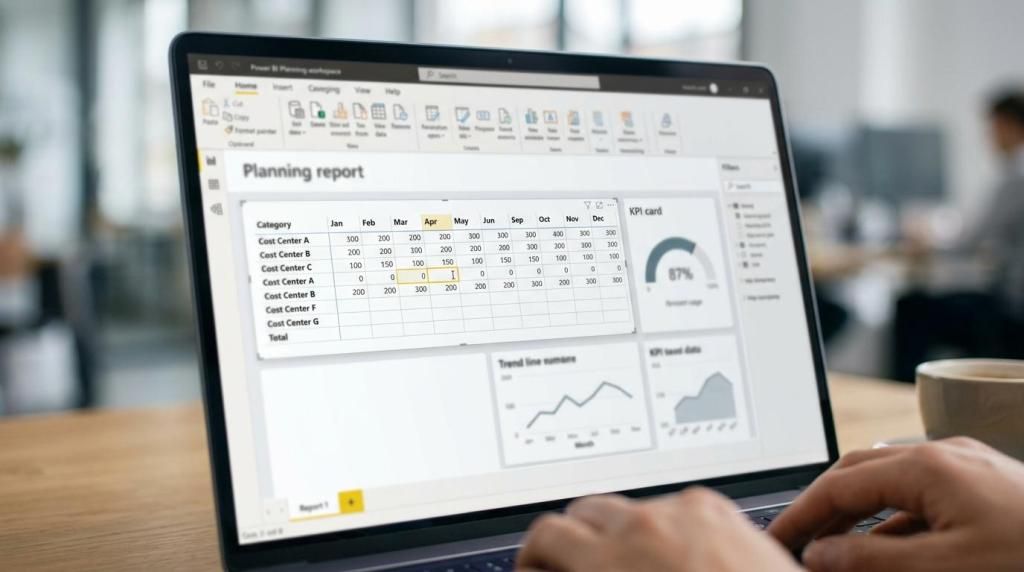
If your team already relies on Microsoft Power BI for reporting, your budgeting software should work in the same place. accoTOOL built accoPLANNING for Power BI so you can enter budgets, forecasts, and adjustments directly inside Power BI and write those changes back to your database in real time.
For finance, operations, and data teams at mid-market to enterprise organizations, that removes a common problem: reporting lives in Power BI, but planning lives somewhere else. accoTOOL closes that gap with Power BI writeback tools for budgeting, forecasting, commenting, and master data management, plus deployment options for cloud, hybrid, or on-prem environments.
accoPLANNING gives you Power BI budgeting software with real-time writeback
accoPLANNING is designed for teams that want to budget inside Power BI instead of exporting reports to spreadsheets or moving users into a separate planning system. You work in a familiar report experience, use grid-style editing to update numbers, and save those changes directly back to your database.
"accoTOOL offers accoPLANNING as a Power BI visual for budgeting, forecasting, and writeback without switching systems."
That matters because Power BI budgeting is increasingly centered on writeback. Microsoft’s own planning stack now supports direct entry and writeback to Dataverse tables and Fabric SQL databases, which confirms where enterprise planning inside Power BI is heading. accoTOOL gives you a Power BI-native way to bring budgeting and planning inputs closer to your governed data environment.
"accoTOOL supports real-time SQL Server writeback in Azure and on-prem environments."
With accoPLANNING, budgeting stays connected to live reporting instead of becoming a disconnected offline exercise. Your planners can update values where they already analyze performance, and your downstream reporting can use the latest entered data without waiting for manual consolidation.
accoTOOL helps finance, operations, and BI teams budget without leaving Power BI
accoTOOL is a strong fit for organizations that already have Power BI adoption and want to extend it into budgeting, reforecasting, and scenario updates. That includes FP&A teams building annual budgets, operations teams adjusting plans during the month, and data teams that need planning data to stay aligned with the reporting model.
Because accoTOOL also serves BI consultancies and Microsoft partners, the platform is relevant when your budgeting solution is being delivered as part of a larger Power BI program. Writeback visuals and APIs make it easier to build planning workflows into the same environment your users already know.
If your budget process needs more than number entry, accoTOOL can also support related collaboration and data governance tasks through accoCOMMENT and accoMASTERDATA for Power BI. That gives you a broader planning setup inside the Microsoft BI experience instead of a patchwork of tools.
"accoTOOL tools are available on Microsoft AppSource with a 30-day free trial."
SQL Server writeback for Power BI budgeting keeps planning data usable
A budgeting tool is only useful if the data you enter can be stored where the business can trust and reuse it. accoTOOL focuses on real-time SQL Server writeback, including Azure and on-prem deployments, so budget data can move back into the systems and reporting flows your organization already manages.
That helps when budgeting is not a standalone finance task. Sales plans, operating expenses, headcount assumptions, and forecast updates often need to flow into operational reporting, planning models, and downstream analytics. accoTOOL keeps that writeback step inside your Power BI budgeting process instead of adding a separate data handling layer for users.
The result is a cleaner operating model for your team. You review actuals in Power BI, enter planning values in Power BI, and persist those changes to SQL Server without breaking the connection between planning and reporting.
Reuse your existing Power BI data model instead of rebuilding planning structures
One of the biggest buying concerns with Power BI budgeting software is implementation effort. Many tools force you to create a special planning schema or rebuild the model around the planning application. accoTOOL takes a different approach by letting you reuse existing Power BI data models without requiring a special schema.
For your team, that can mean a faster path from reporting to planning. Instead of starting over, you can build on the data structures, dimensions, and measures your users already understand.
For your BI team, it also reduces disruption. accoTOOL extends Power BI with writeback and planning behavior while preserving the value of the model work you have already invested in.
Here is where accoTOOL often improves the budgeting process most clearly:
- Less system switching: Budget owners work inside Power BI rather than moving between reports, spreadsheets, and a separate planning application.
- More current numbers: Real-time writeback means entered budget data can be available immediately for reporting and review.
- Lower modeling friction: Reusing existing Power BI data models avoids unnecessary rework and keeps planning closer to the analytics environment.
- Better context: accoCOMMENT and accoMASTERDATA help keep explanations and structural changes closer to the budgeting workflow.
Power BI budgeting software for cloud, hybrid, and on-prem enterprise environments
Deployment flexibility matters when budgeting data touches finance and operational planning. accoTOOL supports cloud, hybrid, and on-prem setups, which is important for organizations that cannot force every planning process into a single hosting model.
That flexibility also makes accoTOOL relevant across regions and IT environments, including organizations in Europe, the United States, and Australia that are standardizing on Power BI but have different data residency, infrastructure, or rollout requirements.
For teams that want a controlled rollout, accoTOOL is certified on Microsoft AppSource. That gives you a familiar path to evaluating and deploying the software in the Microsoft ecosystem you already use.
accoTOOL supports budgeting, forecasting, comments, and master data in one Power BI workflow
Budgeting rarely stops at entering annual numbers. Most teams also need rolling forecasts, assumption updates, commentary, and occasional master data changes during the cycle. accoTOOL addresses that broader planning reality with a focused set of Power BI products.
Depending on your use case, your Power BI planning environment can include:
- accoPLANNING for Power BI: Budgeting, forecasting, planning input, and database writeback directly in Power BI.
- accoCOMMENT for Power BI: Business commentary and planning context kept close to the reports and numbers being reviewed.
- accoMASTERDATA for Power BI: Master data management inside the same Power BI landscape when planning structures need to be updated.
If your team is moving from static budgeting toward more continuous planning, accoTOOL also offers AI-assisted forecasting using Power BI AI Insights. That can help when you want the budgeting layer to support forward-looking analysis instead of only periodic data entry.
When accoTOOL is the right Power BI budgeting software for your organization
accoTOOL is usually the right fit when you already trust Power BI and want budgeting to happen there too. It is especially relevant if you want writeback, SQL Server integration, and a planning experience that stays close to your current reporting model.
You are likely a strong fit for accoTOOL if:
- Your users already work in Power BI: You want higher adoption by keeping budgeting in a familiar interface.
- Your planning data needs governed storage: You want real-time writeback to SQL Server in Azure or on-prem environments.
- Your current model should be reused: You do not want to rebuild your reporting architecture just to add planning.
- Your rollout needs flexibility: You need cloud, hybrid, or on-prem deployment and scalable licensing across Business, Enterprise, or Premium plans.
If you are looking for Power BI budgeting software that combines direct data entry, writeback, and reporting continuity, accoTOOL gives you a practical path forward. Start with accoPLANNING, review the licensing option that fits your environment, and take the next step toward budgeting inside Power BI instead of around it.